Saturday, April 11, 2026
33 C
Mumbai
Advising, Administration, Documentation and Maintenance of various records and statutory compliance
Home Blog Page 55

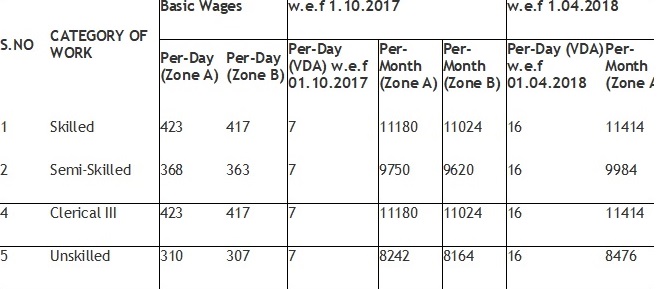
Minimum Wages Goa 01.st April 2018 to 30th Sep 2018

This is to inform that the Minimum wages in Goa has been revised with effect from 1.04.2018. The amended rates for all the categories are as mentioned below:-

Notification 👉VDA-Notification-w.e.f-01.04.2018-Goa

The Uttarakhand Minimum Wages Notification (Apr 2018)

As per notification number 973/4-01/13, Government of Uttarakhand has released Minimum Wages for the state of Uttarakhand effective 1st April 2018

Notification :- 👉The Uttarakhand Minimum Wages Notification 1st Apr 2018

Bihar Minimum Wages 1st Apr 2018 to 30th Sep 2018

Bihar Minimum Wages 1st Apr 2018 to 30th Sep 2018

Notification :- 👉The Bihar Minimum Wages Notification 1st April 2018

Delhi Minimum Wages 1st Apr 2018 to 30th Sep- 2018

Delhi Minimum Wages 1st Apr 2018 to 30th Sep- 2018  respective notification is appended below

👉Delhi – DA revised – April 2018 to September 2018

Uttar Pradesh Minimum Wages 1.4.2018 to 30.09.2018

As per notification Letter No. 186-215/Pravartan -(MW)/15, Government of Uttar Pradesh has released for the state of Uttar Pradesh effective 1st April 2018

  👉  The Uttar Pradesh Minimum Wages Notification 1st April 2018

Chattisgarh Minimum Wages 01st Apr 2018 to 30th Sep 2018

New Minimum Wages Chhattisgarh 1st April 2018 to 30th Sep-2018

Notification:- 👉Chattisgarh Minimum Wages 01-04-18 30-09-2018

Madhya Pradesh Minimum wages 1st Apr 2018 to 30th Sept 2018

Madhya Pradesh Minimum wages from 1st Apr 2018 to 30th Sep-2018 the respective schedule of employment is as under 


Scheduled Employment
Agriculture 
Blanket Manufacturing
Bone Mills
Brick Kilns
Cement pole or manufacture of Cement products.
Chemicals & Pharmaceuticals
Constructions, and maintenance of Irrigation works
Cotton Ginning and Pressing
Engineering Industry
Food Products (including cakes, biscuits, confectionary, Ice-cream & Ice-candy, Beverages)
Forest and Forestry
Fuel Coke 
Handloom Industry
Katha Industry
Khandsari Industry
Kosa Industry
Lime Kiln
Local Authority
Murra Peha
Oil Mills
Plastic Industry
Potteries including manufacture of refractory goods, fire bricks, sanitary works, insulators tiles (excluding those made from cement) stone wire pipes, furnace lining bricks & other ceramic goods
Power Loom (including sizing and processing)
Printing Press
Public Motor Transport
Ramraj or Geru
Rice Mill, Floor Mill, or Dal Mill
Construction and maintenance of Roads and building operation 
Saw Mill
Shop,Commercial establishment, Residential Hotel and Theatre
Stone breaking or stone crushing
Tobacco (including beedi making Manufactory)
Tiles Manufactory (excluding Cement titles)
Any Establishment in which manufacturing activity as defined under section 2 (K) of the Factories Act is carried out and is not covered under any of the other scheduled employments

Tamil Nadu Minimum Wages 1st Apr 2018 31st Mar 2019


Tamil Nadu Minimum Wages 1st Apr 2018  31st Mar 2019  VDA has been increased 

VDA Circular  :- TN – DA Notification – 2018 -19

Shop & Establishment :- MW – Shops Estb – TN – 2018-19
2018-2019

Online EPF Withdrawal & Transfer Claim Process

As per the decision taken in the meeting held on 17th January’2018 regarding PF online claim process to be followed by all the Employees Provident fund Body following are the basic requirement to be fulfilled by the Employer/Employee before applying for Online claim to make the whole process as paperless in this regards very basic details & precaution by the employer & employee  have to take care before executing the process 


1st Step:- Joining formalities


Once the Employee Join the organisation it is the duty of the Employer to fill in New Form No 11 Download 👉 New Form 11 to avail the basic details  & information of the Employee, also equally it is the duty of the Employee to declared his/her UAN  Number if any.

————————————————————————————————–

2nd Step :- UAN Activation Process 


Once the New UAN or Old UAN Link  on the Employer portal it is the duty of the employer to update the same in the payslip of the Employee. Once this is done it is duty of the employee to activate the same.A detail Process has been appended below


—————————————————————————————–

3rd Step:- Modify Basic details

Once the UAN is activated there might be possibilities in case of UAN linking or while generating UAN wrong date of birth/Gender or Name might mismatch ( This might happens in UAN Linking) in this regards Employee has to login to the Member Portal & Update the same a step by step process is appended below


Download 👉 Modify Basic Details  Once the employee makes the changes in the basic details has to be approve by the Employer in the respective Member Portal Member can also upload the KYC 

1. Aadhar Number ( Name as per Aadhar & UAN name should also be as per          Aadhar)

2. Pan Card

3. Bank Details along with IFSC Code.


————————————————————————————————————————–

4th Step:- Online Claim Submission & Transfer Process 


Please note the PF Schemes are Social Security Measures initiated by the Govt. of India with an objective of providing benefits to its member at the time of retirement, hence try to retain it till you attain your retirement age. Moreover, claiming it prematurely is not only violation of the PF Act, but will also attract penal action by the concern authorities


1.As indicated earlier, withdrawal of PF Claims can be done only by           those members who are not employed.

2.Please check your Bank A/c No and IFSC from your KYC menu,                update   correct Bank details and other KYCs (KYC Option under              Manage Menu) before initiating online withdrawal.

3.You will be receiving the OTPs to your registered mobile linked with your Aadhaar and PF. Hence, get your Aadhaar and PF updated with your current Mobile No.

4.In certain browsers, the claims form 19 & 10C will be indicated separately and combined in some browsers, you have to select based on the option available.

5.Portal or PAN/ Aadhaar servers may be down at the time of verification or during the claim process. Please keep trying it till your claim process is completed.

6.You can not claim the PF withdrawal on the portal through online, if you have not completed 60 days of waiting period from your last working day, as per the PF Norms.

7.If, PF Tenure less than 6 months, you can Claim only PF(Form 19), EPS( Form 10C) is not applicable.


8.If, PF Tenure is More than 9 years 6 months, you can Claim only PF(Form 19), for EPS(Form 10C) Member Should Obtain Scheme Certificate from RPFC

Download Full Process flow 👉 PF ONLINE WITHDRAWAL PROCESS-(19 & 10C) 

Transfer Process :- Online Transfer-process 


For any queries you can call me or email me on prakash@pcsmgmt.com my team will certainly help you